खटखटाहट सेंसर
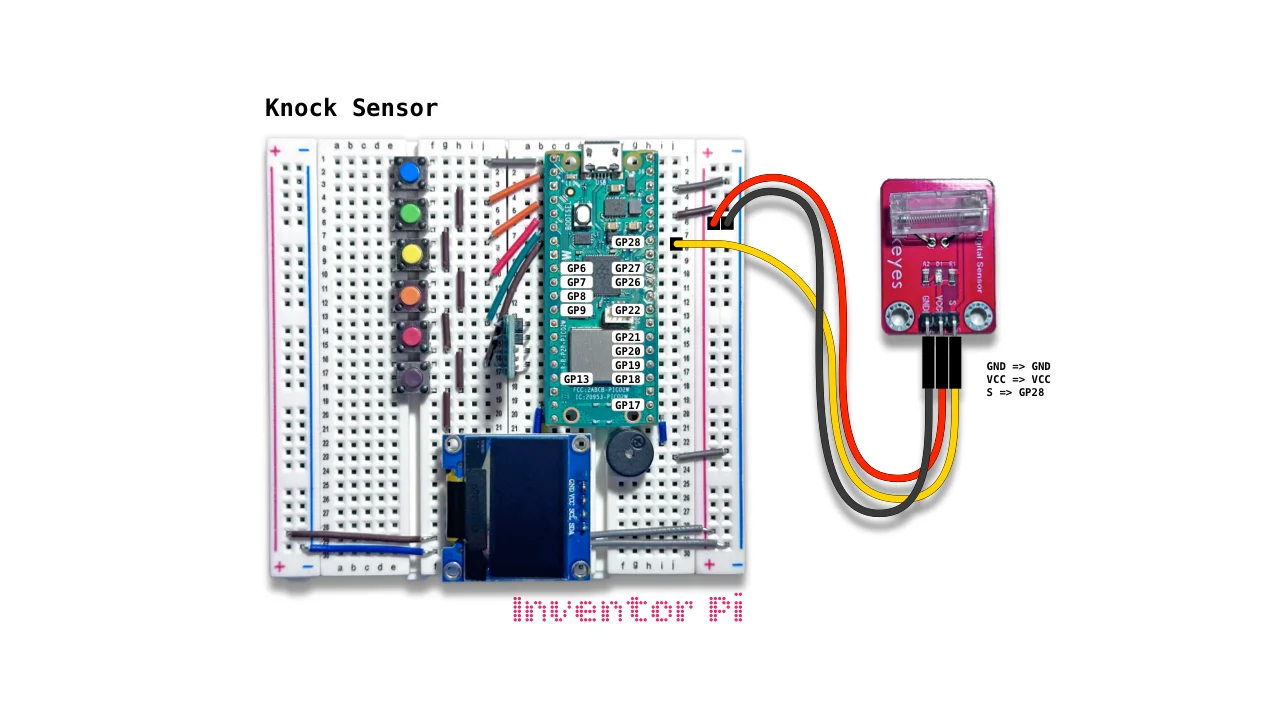
माइक्रो पाइथन कोड का एक उदाहरण Raspberry Pi Pico 2W माइक्रोकंट्रोलर पर चल रहा है ब्रेडबोर्ड पर कॉइल स्प्रिंग, आरजीबी एलईडी मॉड्यूल और ओएलईडी डिस्प्ले मॉड्यूल (एसएसडी1306) के साथ एक नॉकिंग सेंसर मॉड्यूल से जुड़ा हुआ है। अचानक कंपन का पता चलने पर एलईडी का रंग बदलने और डिस्प्ले पर स्थिति दिखाने के लिए।
एक नॉकिंग सेंसर कंपन का पता लगाता है।. यह विशेष मॉड्यूल स्प्रिंग-आधारित कंपन स्विच का उपयोग करता है।. जब मॉड्यूल स्थिर होता है, तो स्प्रिंग केंद्र पिन को नहीं छूती है, लेकिन जब इसे धक्का लगता है या हिलाया जाता है, तो स्प्रिंग हिलती है और केंद्र पिन से टकराती है, जिससे सर्किट क्षण भर के लिए बंद हो जाता है।. सीढ़ी चढ़ने वाले रोबोट के लिए, एक नॉकिंग सेंसर यह पता लगा सकता है कि कब उसका विस्तारित हाथ सीढ़ी के पायदान से टकराता है, और फिर अगली गति शुरू कर सकता है।. जहां क्रैश सेंसर को टक्कर के बिंदु पर लगाना आवश्यक होगा, वहीं नॉक सेंसर पूरी भुजा में कंपन का पता लगा सकता है।. परीक्षण के लिए, स्क्रिप्ट चलाएँ, फिर नॉक सेंसर सहित पूरे ब्रेडबोर्ड को हाथ में पकड़ें और उसे ज़ोर से हिलाएँ, जिससे वह अचानक रुक जाए।.
Thonny में knock_sensor.py नाम से एक नई फ़ाइल बनाएँ।. नीचे दिए गए कोड को कॉपी करके अपनी बनाई गई फ़ाइल में पेस्ट करें।.
1
2
3
4
5
6
7
8
9
10
11
12
13
14
15
16
17
18
19
20
21
22
23
24
25
26
27
28
29
30
31
32
33
34
35
36
37
38
39
40
41
42
43

print("\nKnock Sensor")

# DESCRIPTION

# A knock sensor detects vibrations. This particular module uses a spring-based vibration switch.
# When the module is still, the spring does not touch the center pin, but when bumped or shaken,
# the spring sways and hits the center pin closing the circuit momentarily. For a ladder climbing robot,
# a knock sensor could detect when an extending arm hits a ladder rung, and then initiate next motion.
# While a crash sensor would need to be placed at the point of impact, a knock sensor could detect
# vibrations across an entire arm. To test, run the script, then hold the entire breadboard along with
# the knock sensor in hand, and give it a big shake bringing it to a sudden stop.

# CONNECTIONS REQUIRED

# Connect Knock Sensor (KY-031) module
# (labeled 'Digital Sensor' with an encased spring)
#   Pins: GND => GND, VCC => VCC, S => GP28

from time import sleep
from machine import Pin
from oled import OLED
from buzzer import Buzzer

knock_sensor = Pin(28, Pin.IN, Pin.PULL_UP)
oled = OLED(scl_pin=15, sda_pin=14)
buzzer = Buzzer(pwm_pin=16)

try:
    while True:
        oled.print("Shake...")

        # Sensor value == 1 => Knock detected, wait 2 seconds
        if knock_sensor.value() == 0:
            buzzer.play_tone(600)
            oled.print("Knock knock!")
            sleep(2)

except KeyboardInterrupt:
    print("\nInterrupted by user!")

finally:
    oled.reset()
    buzzer.reset()