دستک سینسر
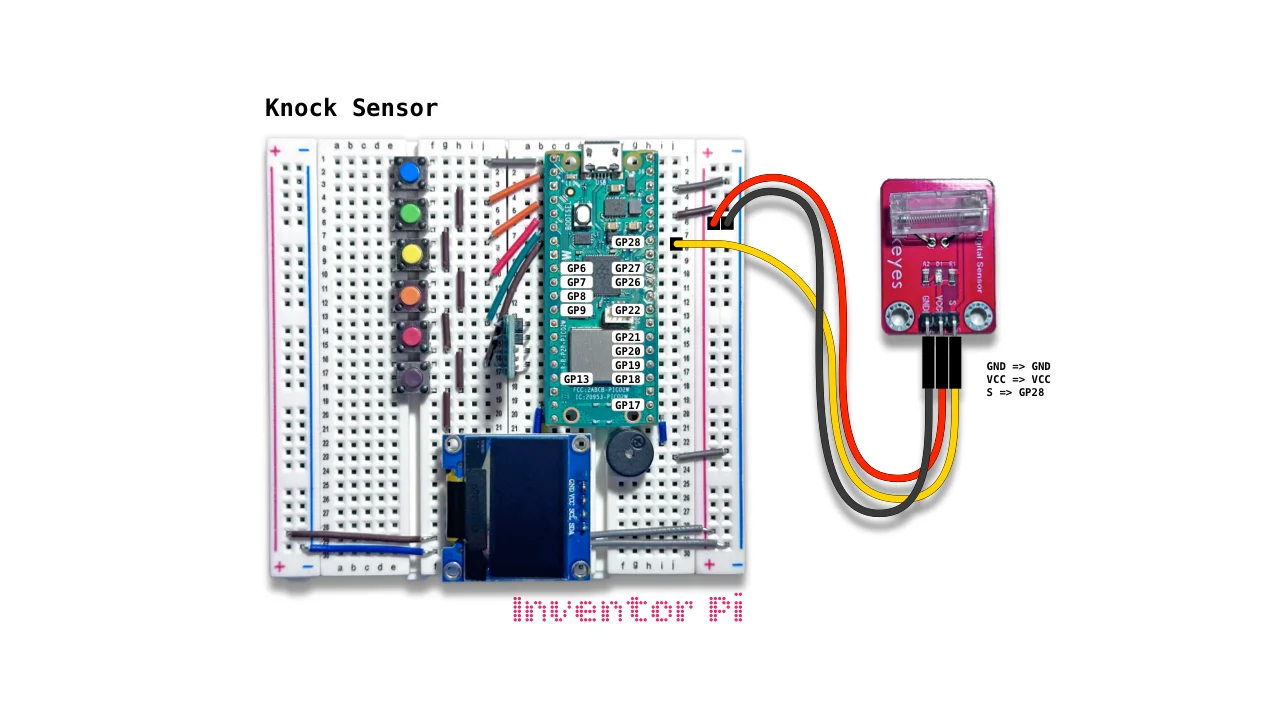
مائیکرو پیتھون کوڈ کی مثال Raspberry Pi Pico 2 W مائکروکنٹرولر پر چل رہا ہے۔ ایک کوائلڈ اسپرنگ کے ساتھ ایک دستک سینسر ماڈیول سے منسلک، ایک آرجیبی ایل ای ڈی ماڈیول اور ایک OLED ڈسپلے ماڈیول (SSD1306) ایک بریڈ بورڈ پر ایل ای ڈی کا رنگ تبدیل کرنے اور اچانک ہلنے کا پتہ چلنے پر ڈسپلے پر اسٹیٹس دکھائیں۔
ایک دستک سینسر کمپن کا پتہ لگاتا ہے۔. یہ خاص ماڈیول بہار پر مبنی وائبریشن سوئچ کا استعمال کرتا ہے۔. جب ماڈیول ساکن ہوتا ہے، اسپرنگ سینٹر پن کو نہیں چھوتا، لیکن جب ٹکرایا جاتا ہے یا ہل جاتا ہے، تو اسپرنگ سرکٹ کو لمحہ بہ لمحہ بند کرتے ہوئے سنٹر پن سے ٹکرا جاتا ہے۔. سیڑھی پر چڑھنے والے روبوٹ کے لیے، دستک کا سینسر اس بات کا پتہ لگا سکتا ہے کہ جب ایک بڑھا ہوا بازو سیڑھی کی دھار سے ٹکراتا ہے، اور پھر اگلی حرکت شروع کر سکتا ہے۔. جبکہ ایک کریش سینسر کو اثر کے مقام پر رکھنے کی ضرورت ہوگی، ایک دستک سینسر پورے بازو میں کمپن کا پتہ لگا سکتا ہے۔. جانچنے کے لیے، اسکرپٹ کو چلائیں، پھر دستک کے سینسر کے ساتھ پورے بریڈ بورڈ کو ہاتھ میں پکڑیں، اور اسے ایک بڑا جھٹکا دیں، اسے اچانک رکنے پر لے آئیں۔.
Thonny میں ایک نئی فائل بنائیں، knock_sensor.py نام کے ساتھ. نیچے دیے گئے کوڈ کو اپنی بنائی ہوئی فائل میں کاپی اور پیسٹ کریں۔.
1
2
3
4
5
6
7
8
9
10
11
12
13
14
15
16
17
18
19
20
21
22
23
24
25
26
27
28
29
30
31
32
33
34
35
36
37
38
39
40
41
42
43

print("\nKnock Sensor")

# DESCRIPTION

# A knock sensor detects vibrations. This particular module uses a spring-based vibration switch.
# When the module is still, the spring does not touch the center pin, but when bumped or shaken,
# the spring sways and hits the center pin closing the circuit momentarily. For a ladder climbing robot,
# a knock sensor could detect when an extending arm hits a ladder rung, and then initiate next motion.
# While a crash sensor would need to be placed at the point of impact, a knock sensor could detect
# vibrations across an entire arm. To test, run the script, then hold the entire breadboard along with
# the knock sensor in hand, and give it a big shake bringing it to a sudden stop.

# CONNECTIONS REQUIRED

# Connect Knock Sensor (KY-031) module
# (labeled 'Digital Sensor' with an encased spring)
#   Pins: GND => GND, VCC => VCC, S => GP28

from time import sleep
from machine import Pin
from oled import OLED
from buzzer import Buzzer

knock_sensor = Pin(28, Pin.IN, Pin.PULL_UP)
oled = OLED(scl_pin=15, sda_pin=14)
buzzer = Buzzer(pwm_pin=16)

try:
    while True:
        oled.print("Shake...")

        # Sensor value == 1 => Knock detected, wait 2 seconds
        if knock_sensor.value() == 0:
            buzzer.play_tone(600)
            oled.print("Knock knock!")
            sleep(2)

except KeyboardInterrupt:
    print("\nInterrupted by user!")

finally:
    oled.reset()
    buzzer.reset()