Sensore di detonazione
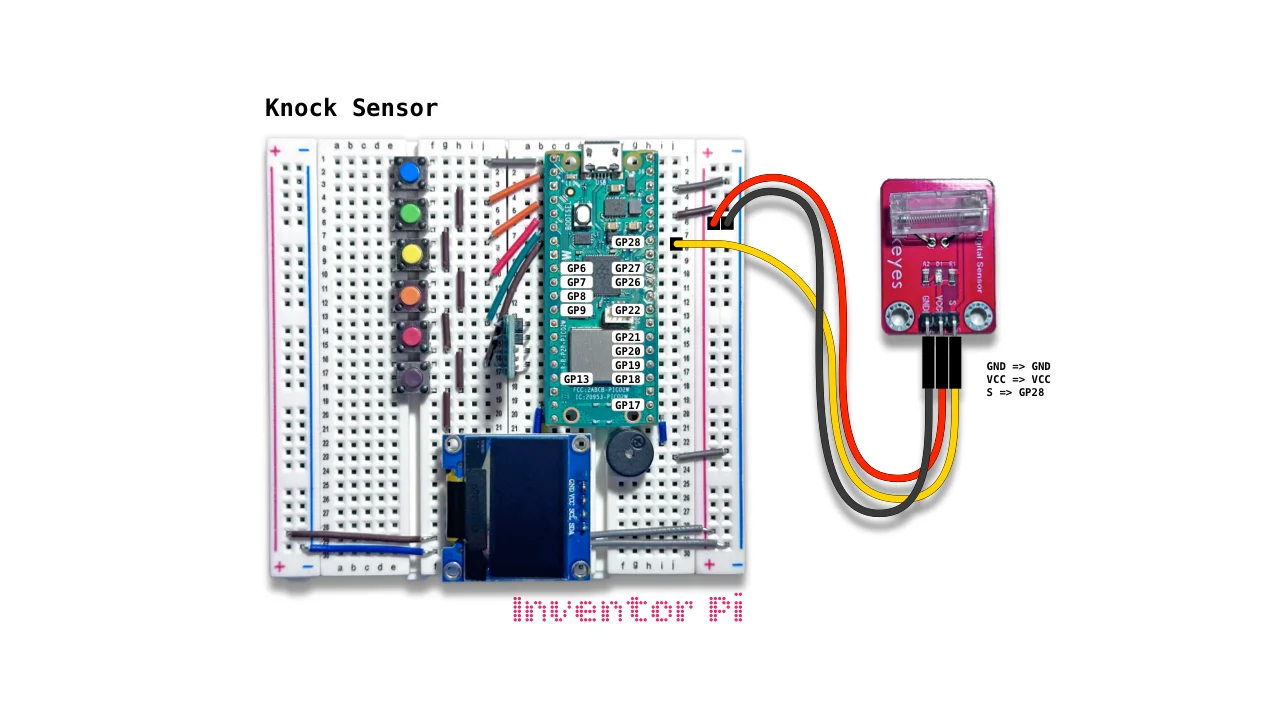
Un esempio di codice MicroPython in esecuzione su un microcontrollore Raspberry Pi Pico 2 W collegato a un modulo sensore di urto con molla a spirale, un modulo LED RGB e un modulo display OLED (SSD1306) su una breadboard per cambiare il colore del LED e mostrare lo stato sul display quando viene rilevata una scossa improvvisa
Un sensore di battito rileva le vibrazioni. Questo particolare modulo utilizza un interruttore a vibrazione basato su una molla. Quando il modulo è fermo, la molla non tocca il pin centrale, ma quando viene urtato o scosso, la molla oscilla e colpisce il pin centrale chiudendo momentaneamente il circuito. Per un robot che si arrampica sulle scale, un sensore di urto potrebbe rilevare quando un braccio estensibile colpisce un piolo della scala e quindi avviare il movimento successivo. Mentre un sensore di collisione dovrebbe essere posizionato nel punto d'impatto, un sensore di urto potrebbe rilevare le vibrazioni lungo tutto il braccio. Per testare, esegui lo script, poi tieni in mano l'intera breadboard insieme al sensore di urto e scuotila energicamente, fermandola bruscamente.
Crea un nuovo file in Thonny, con il nome knock_sensor.py. Copia e incolla il codice seguente nel file che hai creato.
1
2
3
4
5
6
7
8
9
10
11
12
13
14
15
16
17
18
19
20
21
22
23
24
25
26
27
28
29
30
31
32
33
34
35
36
37
38
39
40
41
42
43

print("\nKnock Sensor")

# DESCRIPTION

# A knock sensor detects vibrations. This particular module uses a spring-based vibration switch.
# When the module is still, the spring does not touch the center pin, but when bumped or shaken,
# the spring sways and hits the center pin closing the circuit momentarily. For a ladder climbing robot,
# a knock sensor could detect when an extending arm hits a ladder rung, and then initiate next motion.
# While a crash sensor would need to be placed at the point of impact, a knock sensor could detect
# vibrations across an entire arm. To test, run the script, then hold the entire breadboard along with
# the knock sensor in hand, and give it a big shake bringing it to a sudden stop.

# CONNECTIONS REQUIRED

# Connect Knock Sensor (KY-031) module
# (labeled 'Digital Sensor' with an encased spring)
#   Pins: GND => GND, VCC => VCC, S => GP28

from time import sleep
from machine import Pin
from oled import OLED
from buzzer import Buzzer

knock_sensor = Pin(28, Pin.IN, Pin.PULL_UP)
oled = OLED(scl_pin=15, sda_pin=14)
buzzer = Buzzer(pwm_pin=16)

try:
    while True:
        oled.print("Shake...")

        # Sensor value == 1 => Knock detected, wait 2 seconds
        if knock_sensor.value() == 0:
            buzzer.play_tone(600)
            oled.print("Knock knock!")
            sleep(2)

except KeyboardInterrupt:
    print("\nInterrupted by user!")

finally:
    oled.reset()
    buzzer.reset()