光中断器
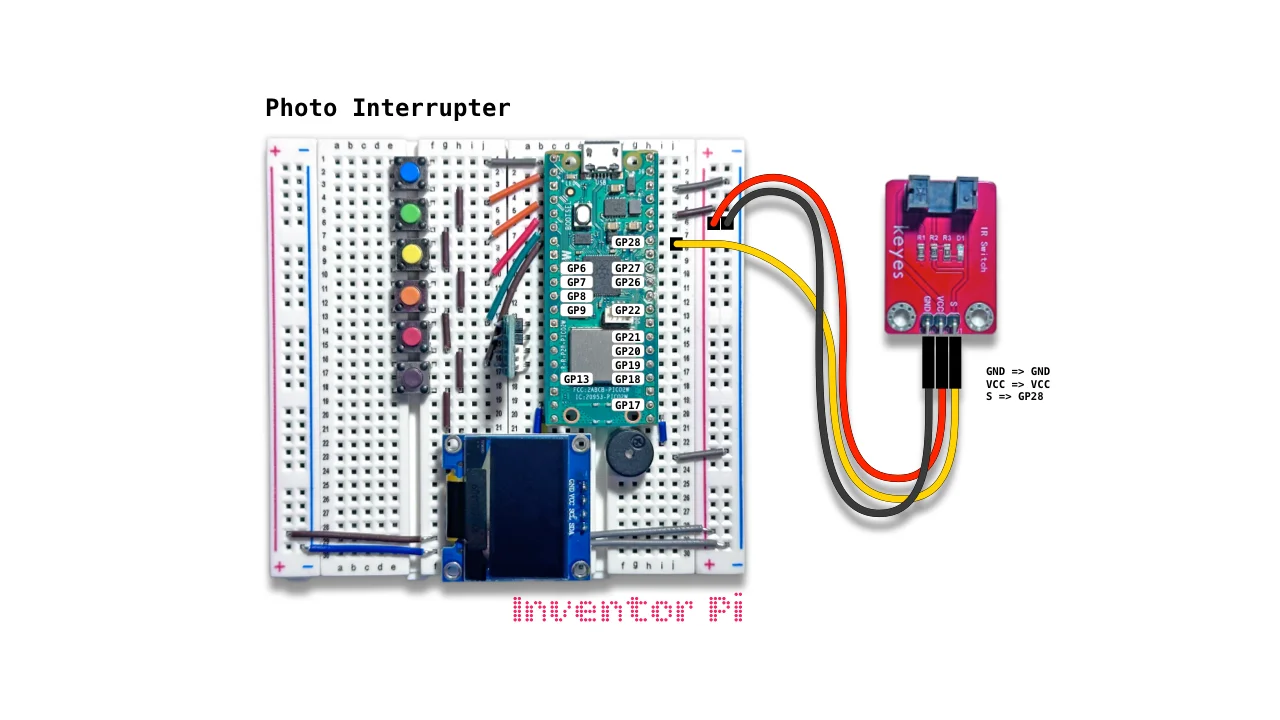
MicroPython 代码示例 运行在 Raspberry Pi Pico 2 W 微控制器上 在面包板上,连接着光电断路器模块、RGB LED 模块和 OLED 显示模块 (SSD1306)。 每次光电中断器光束被中断时,显示屏上的计数增加。
光电断路器模块会将红外光束从发射器发送到接收器(模块上的两个黑色方块),并检测该光束何时被遮挡。. 它用于检测3D打印机、数控机床和机器人的行程终点。. 它还用于计算旋转的开槽圆盘的脉冲数,从而计算机器人和智能汽车中的电机或车轮速度。. 打印机可以检测纸张是否存在。.
在 Thonny 中创建一个名为 photo_interrupter.py 的新文件。. 将以下代码复制并粘贴到您创建的文件中。.
1
2
3
4
5
6
7
8
9
10
11
12
13
14
15
16
17
18
19
20
21
22
23
24
25
26
27
28
29
30
31
32
33
34
35
36
37
38
39
40
41
42
43
44
45
46
47
48
49
50

print("\nPhoto Interrupter")

# DESCRIPTION

# A photo interrupter module sends infrared light beam from an emitter to a receiver
# (the two black blocks on the module), and detects when this beam is blocked.
# It is used to detect end-of-travel in 3D printers, CNC machines and robots. It is
# also used to count the pulses of a slotted disc rotating to calculate motor or wheel
# speed in robotics and smart cars. In a printer, it detects when a paper is present.

# CONNECTIONS REQUIRED

# Connect Photo Interrupter (KY-010) module (labeled 'IR Switch')
#   Pins: GND => GND, VCC => VCC, S => GP28

from machine import Pin
from oled import OLED
from rgbled import RGBLED
from buzzer import Buzzer

sensor = Pin(28, Pin.IN, Pin.PULL_UP)
oled = OLED(scl_pin=15, sda_pin=14)
buzzer = Buzzer(pwm_pin=16)
rgbled = RGBLED(red_pin=12, green_pin=11, blue_pin=10)

counter = 0

try:
    while True:
        rgbled.reset()

        # loop while nothing detected
        while sensor.value() == 0: pass

        # sensor value is no longer zero => object detected
        counter += 1
        oled.print(f"Counter: {counter}")
        rgbled.set_color(b=255)
        buzzer.play_tone(600)

        # loop while object is still present
        while sensor.value() == 1: pass

except KeyboardInterrupt:
    print("\nInterrupted by user!")

finally:
    oled.reset()
    rgbled.reset()
    buzzer.reset()