फोटो इंटरप्टर
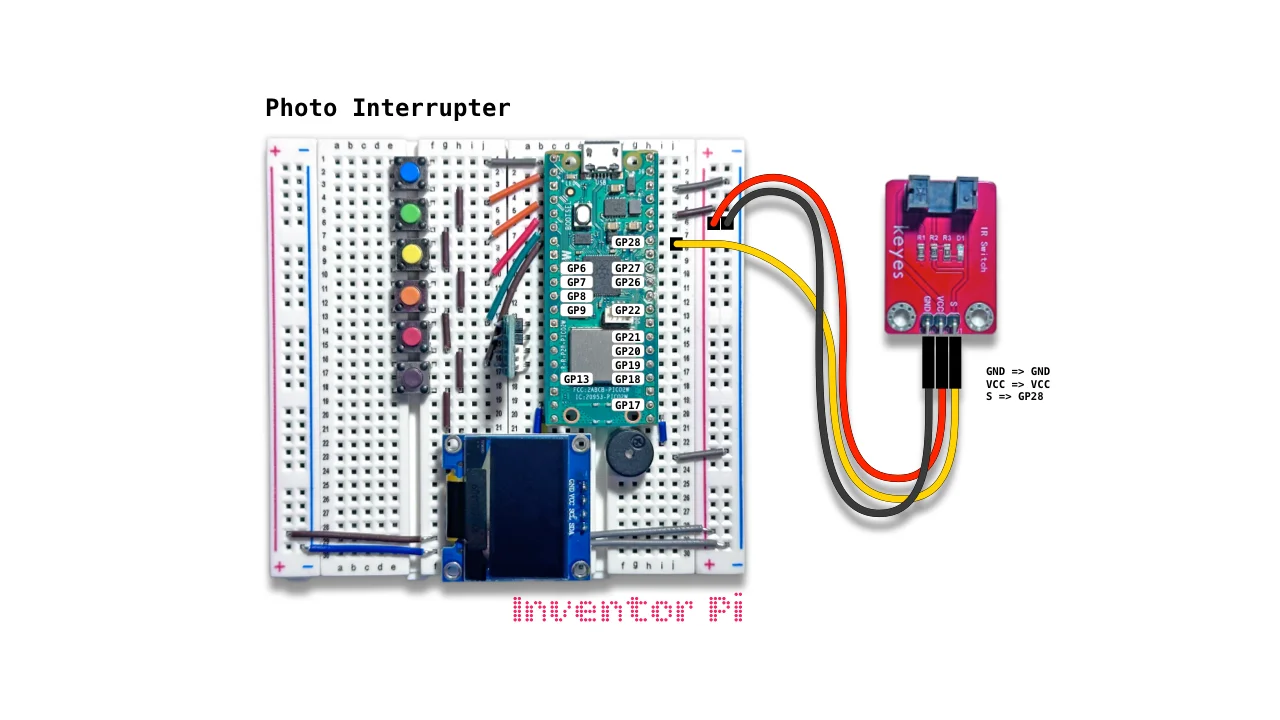
माइक्रो पाइथन कोड का एक उदाहरण Raspberry Pi Pico 2W माइक्रोकंट्रोलर पर चल रहा है ब्रेडबोर्ड पर फोटो इंटरप्टर मॉड्यूल, आरजीबी एलईडी मॉड्यूल और ओएलईडी डिस्प्ले मॉड्यूल (एसएसडी1306) से जुड़ा हुआ है। फोटो इंटरप्टर लाइट बीम के बाधित होने पर डिस्प्ले पर गिनती बढ़ाने के लिए।
एक फोटो इंटरप्टर मॉड्यूल उत्सर्जक से रिसीवर (मॉड्यूल पर मौजूद दो काले ब्लॉक) तक अवरक्त प्रकाश किरण भेजता है और इस किरण के अवरुद्ध होने का पता लगाता है।. इसका उपयोग 3डी प्रिंटर, सीएनसी मशीन और रोबोट में यात्रा के अंत का पता लगाने के लिए किया जाता है।. इसका उपयोग रोबोटिक्स और स्मार्ट कारों में मोटर या पहिए की गति की गणना करने के लिए घूमने वाली स्लॉटेड डिस्क की पल्स गिनने के लिए भी किया जाता है।. प्रिंटर में, यह पता लगाता है कि कागज मौजूद है या नहीं।.
Thonny में photo_interrupter.py नाम से एक नई फ़ाइल बनाएँ।. नीचे दिए गए कोड को कॉपी करके अपनी बनाई गई फ़ाइल में पेस्ट करें।.
1
2
3
4
5
6
7
8
9
10
11
12
13
14
15
16
17
18
19
20
21
22
23
24
25
26
27
28
29
30
31
32
33
34
35
36
37
38
39
40
41
42
43
44
45
46
47
48
49
50

print("\nPhoto Interrupter")

# DESCRIPTION

# A photo interrupter module sends infrared light beam from an emitter to a receiver
# (the two black blocks on the module), and detects when this beam is blocked.
# It is used to detect end-of-travel in 3D printers, CNC machines and robots. It is
# also used to count the pulses of a slotted disc rotating to calculate motor or wheel
# speed in robotics and smart cars. In a printer, it detects when a paper is present.

# CONNECTIONS REQUIRED

# Connect Photo Interrupter (KY-010) module (labeled 'IR Switch')
#   Pins: GND => GND, VCC => VCC, S => GP28

from machine import Pin
from oled import OLED
from rgbled import RGBLED
from buzzer import Buzzer

sensor = Pin(28, Pin.IN, Pin.PULL_UP)
oled = OLED(scl_pin=15, sda_pin=14)
buzzer = Buzzer(pwm_pin=16)
rgbled = RGBLED(red_pin=12, green_pin=11, blue_pin=10)

counter = 0

try:
    while True:
        rgbled.reset()

        # loop while nothing detected
        while sensor.value() == 0: pass

        # sensor value is no longer zero => object detected
        counter += 1
        oled.print(f"Counter: {counter}")
        rgbled.set_color(b=255)
        buzzer.play_tone(600)

        # loop while object is still present
        while sensor.value() == 1: pass

except KeyboardInterrupt:
    print("\nInterrupted by user!")

finally:
    oled.reset()
    rgbled.reset()
    buzzer.reset()