Interruttore fotografico
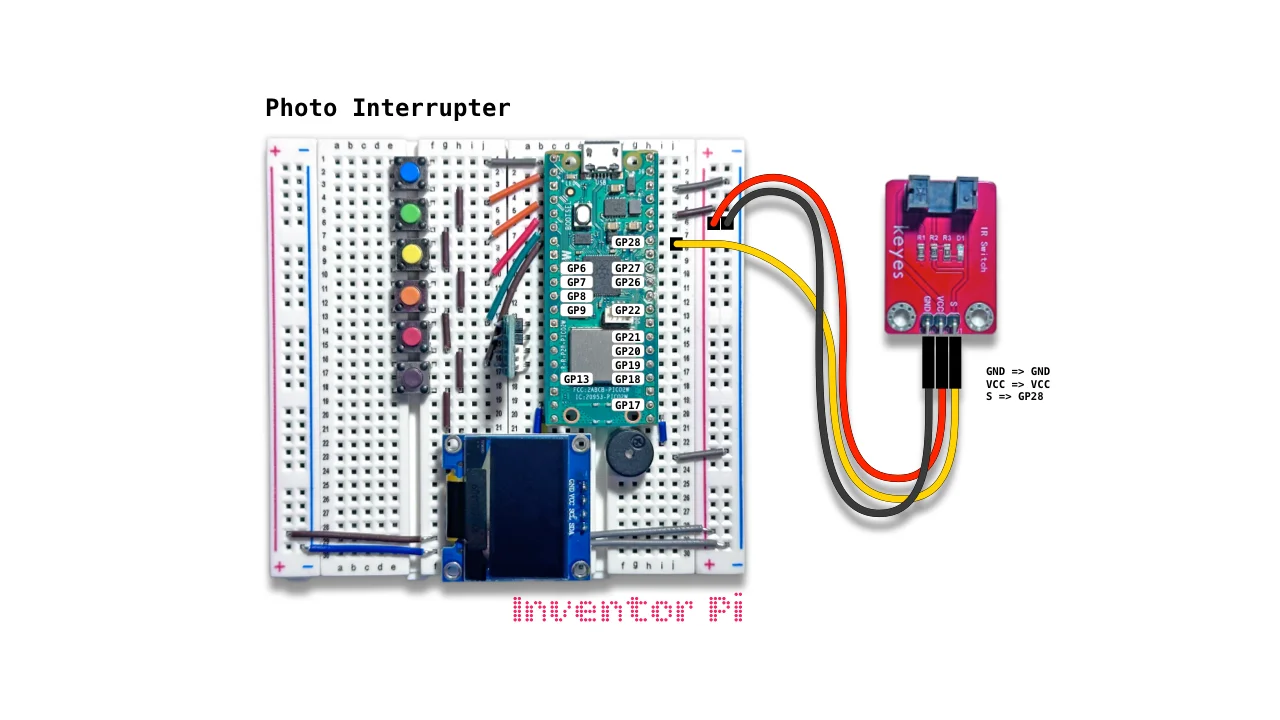
Un esempio di codice MicroPython in esecuzione su un microcontrollore Raspberry Pi Pico 2 W collegato a un modulo fotointerruttore, un modulo LED RGB e un modulo display OLED (SSD1306) su una breadboard per incrementare il conteggio sul display ogni volta che il raggio luminoso del fotointerruttore viene interrotto
Un modulo fotointerruttore invia un raggio di luce infrarossa da un emettitore a un ricevitore (i due blocchi neri sul modulo) e rileva quando questo raggio viene bloccato. Viene utilizzato per rilevare la fine della corsa nelle stampanti 3D, nelle macchine CNC e nei robot. Viene inoltre utilizzato per contare gli impulsi di un disco scanalato rotante al fine di calcolare la velocità del motore o della ruota nella robotica e nelle auto intelligenti. In una stampante, rileva quando è presente la carta.
Crea un nuovo file in Thonny, con il nome photo_interrupter.py. Copia e incolla il codice seguente nel file che hai creato.
1
2
3
4
5
6
7
8
9
10
11
12
13
14
15
16
17
18
19
20
21
22
23
24
25
26
27
28
29
30
31
32
33
34
35
36
37
38
39
40
41
42
43
44
45
46
47
48
49
50

print("\nPhoto Interrupter")

# DESCRIPTION

# A photo interrupter module sends infrared light beam from an emitter to a receiver
# (the two black blocks on the module), and detects when this beam is blocked.
# It is used to detect end-of-travel in 3D printers, CNC machines and robots. It is
# also used to count the pulses of a slotted disc rotating to calculate motor or wheel
# speed in robotics and smart cars. In a printer, it detects when a paper is present.

# CONNECTIONS REQUIRED

# Connect Photo Interrupter (KY-010) module (labeled 'IR Switch')
#   Pins: GND => GND, VCC => VCC, S => GP28

from machine import Pin
from oled import OLED
from rgbled import RGBLED
from buzzer import Buzzer

sensor = Pin(28, Pin.IN, Pin.PULL_UP)
oled = OLED(scl_pin=15, sda_pin=14)
buzzer = Buzzer(pwm_pin=16)
rgbled = RGBLED(red_pin=12, green_pin=11, blue_pin=10)

counter = 0

try:
    while True:
        rgbled.reset()

        # loop while nothing detected
        while sensor.value() == 0: pass

        # sensor value is no longer zero => object detected
        counter += 1
        oled.print(f"Counter: {counter}")
        rgbled.set_color(b=255)
        buzzer.play_tone(600)

        # loop while object is still present
        while sensor.value() == 1: pass

except KeyboardInterrupt:
    print("\nInterrupted by user!")

finally:
    oled.reset()
    rgbled.reset()
    buzzer.reset()