تصویر میں مداخلت کرنے والا
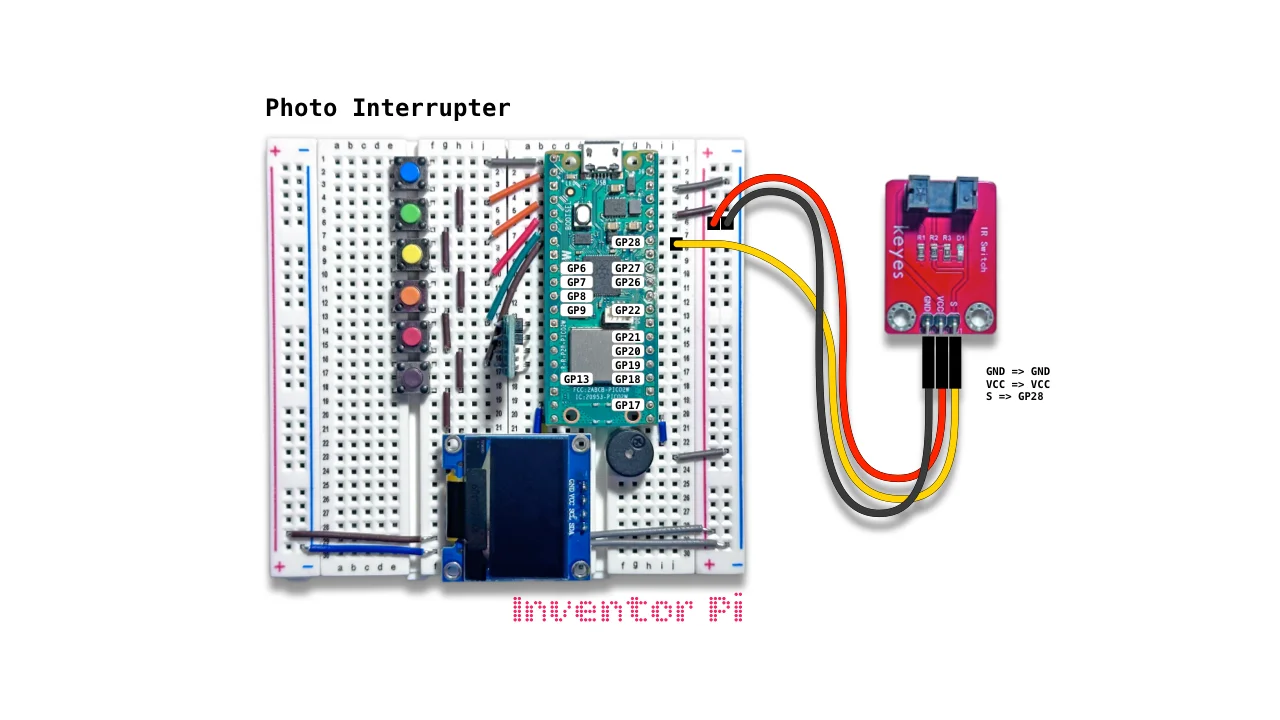
مائیکرو پیتھون کوڈ کی مثال Raspberry Pi Pico 2 W مائکروکنٹرولر پر چل رہا ہے۔ بریڈ بورڈ پر ایک فوٹو انٹرپرٹر ماڈیول، ایک آرجیبی ایل ای ڈی ماڈیول اور OLED ڈسپلے ماڈیول (SSD1306) سے منسلک ہر بار جب فوٹو انٹرپرٹر لائٹ بیم میں خلل پڑتا ہے تو ڈسپلے پر گنتی کو بڑھانے کے لیے
ایک فوٹو انٹرپرٹر ماڈیول ایک ایمیٹر سے ایک رسیور (ماڈیول پر دو سیاہ بلاکس) کو اورکت روشنی کی شعاع بھیجتا ہے، اور پتہ لگاتا ہے کہ یہ شہتیر کب بلاک ہوتا ہے۔. اس کا استعمال 3D پرنٹرز، CNC مشینوں اور روبوٹس میں سفر کے اختتام کا پتہ لگانے کے لیے کیا جاتا ہے۔. یہ روبوٹکس اور سمارٹ کاروں میں موٹر یا پہیے کی رفتار کا حساب لگانے کے لیے گھومنے والی سلاٹڈ ڈسک کی دالیں گننے کے لیے بھی استعمال ہوتا ہے۔. ایک پرنٹر میں، یہ پتہ لگاتا ہے کہ کب کوئی کاغذ موجود ہے۔.
Thonny میں ایک نئی فائل بنائیں، فائل کا نام photo_interrupter.py کے ساتھ. نیچے دیے گئے کوڈ کو اپنی بنائی ہوئی فائل میں کاپی اور پیسٹ کریں۔.
1
2
3
4
5
6
7
8
9
10
11
12
13
14
15
16
17
18
19
20
21
22
23
24
25
26
27
28
29
30
31
32
33
34
35
36
37
38
39
40
41
42
43
44
45
46
47
48
49
50

print("\nPhoto Interrupter")

# DESCRIPTION

# A photo interrupter module sends infrared light beam from an emitter to a receiver
# (the two black blocks on the module), and detects when this beam is blocked.
# It is used to detect end-of-travel in 3D printers, CNC machines and robots. It is
# also used to count the pulses of a slotted disc rotating to calculate motor or wheel
# speed in robotics and smart cars. In a printer, it detects when a paper is present.

# CONNECTIONS REQUIRED

# Connect Photo Interrupter (KY-010) module (labeled 'IR Switch')
#   Pins: GND => GND, VCC => VCC, S => GP28

from machine import Pin
from oled import OLED
from rgbled import RGBLED
from buzzer import Buzzer

sensor = Pin(28, Pin.IN, Pin.PULL_UP)
oled = OLED(scl_pin=15, sda_pin=14)
buzzer = Buzzer(pwm_pin=16)
rgbled = RGBLED(red_pin=12, green_pin=11, blue_pin=10)

counter = 0

try:
    while True:
        rgbled.reset()

        # loop while nothing detected
        while sensor.value() == 0: pass

        # sensor value is no longer zero => object detected
        counter += 1
        oled.print(f"Counter: {counter}")
        rgbled.set_color(b=255)
        buzzer.play_tone(600)

        # loop while object is still present
        while sensor.value() == 1: pass

except KeyboardInterrupt:
    print("\nInterrupted by user!")

finally:
    oled.reset()
    rgbled.reset()
    buzzer.reset()