Lesson Plan for Teachers
Table of Contents
- Reference Slides for the Workshop
- Class Experiments Kit
- Breadboard Connections and Safety
- Lesson Plan Outline
- Some Additional Notes
- Class Experiments Kit Contents
Teachers can run a one hour workshop with middle school students interested in STEM. Each class experiments kit includes 5 identical invention kits and one Additional Sensors Kit. There is also a “Get started with MicroPython on Raspberry Pi Pico” book included, which is not essential to running the workshop. It is available for optional extra reading, if desired.
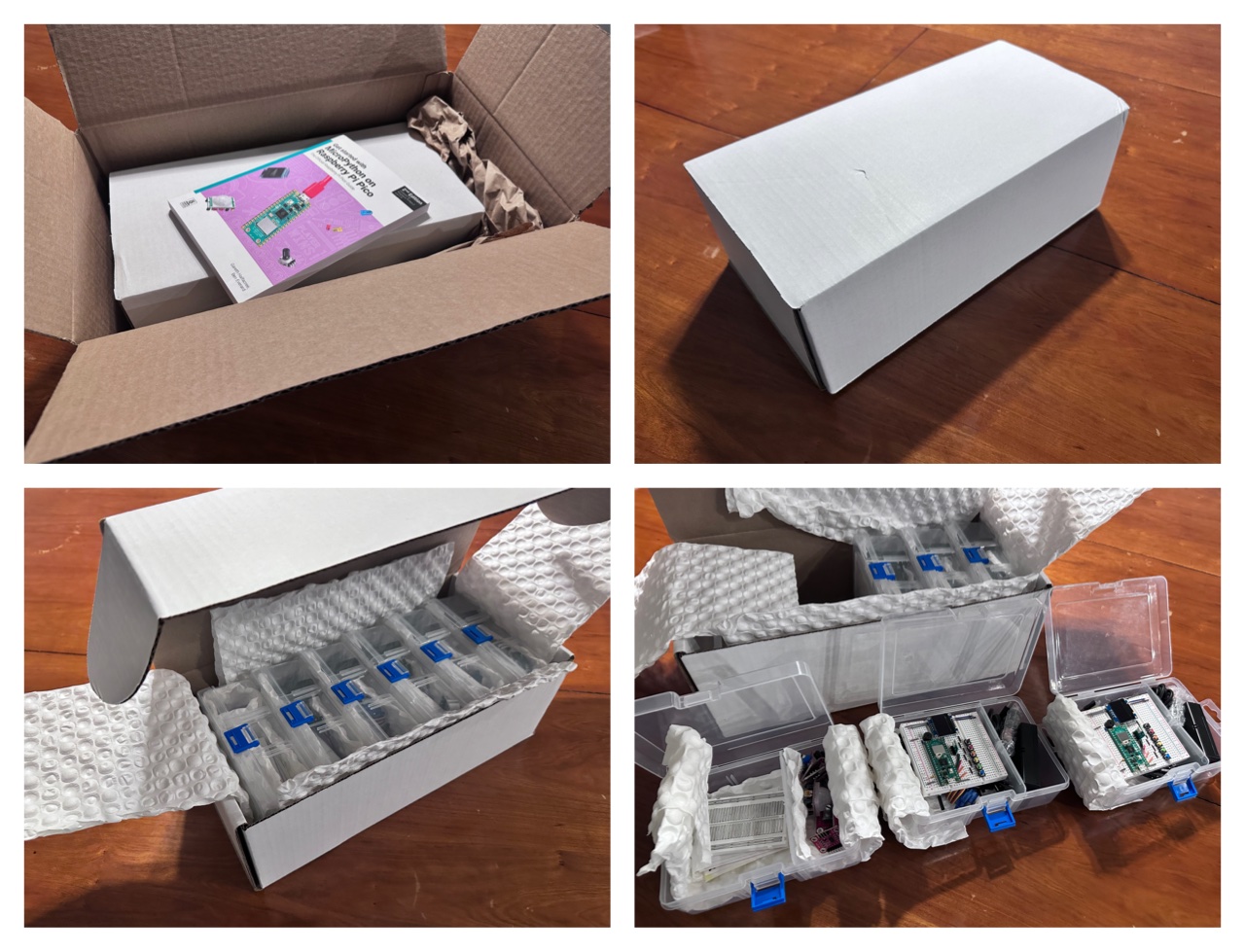 Class Experiments Kit includes 5 identical invention kits and one Additional Sensors Kit.
Reference Slides for the Workshop
Reference slides from our first workshop are included below, which you can use as-is, or incorporate within your presentation.
 Download Slides ↓
Class Experiments Kit
Please familiarize yourself with the contents of the invention kit and the Additional Sensors Kit. You should use the Getting Started section of this website to try out the different experiments yourself before the class. The Additional Sensors Kit includes reward stickers that you can distribute for the best creative ideas, active participation, etc. There are also some tiny NFC nail stickers that light up when brought near a smartphone with NFC (often at the back near the top center).
The first step is installing the Thonny app. Please share these instructions with the students ahead of time, so they can install the app on their laptops before the class.
Breadboard Connections and Safety
It is important for the students to learn how breadboard connections work and to be safe. The Additional Sensors Kit includes a breadboard with no backing to show how it works. There is a resettable fuse on the breadboard which disconnects the circuit in case a student accidentally creates a short circuit on the breadboard. The students still need to verify all connections before powering on the circuit, because incorrect connections to the sensors can cause permanent damage to their sensitive electronics, rendering them useless. The Do’s and Don’ts section covers important points to keep in mind.
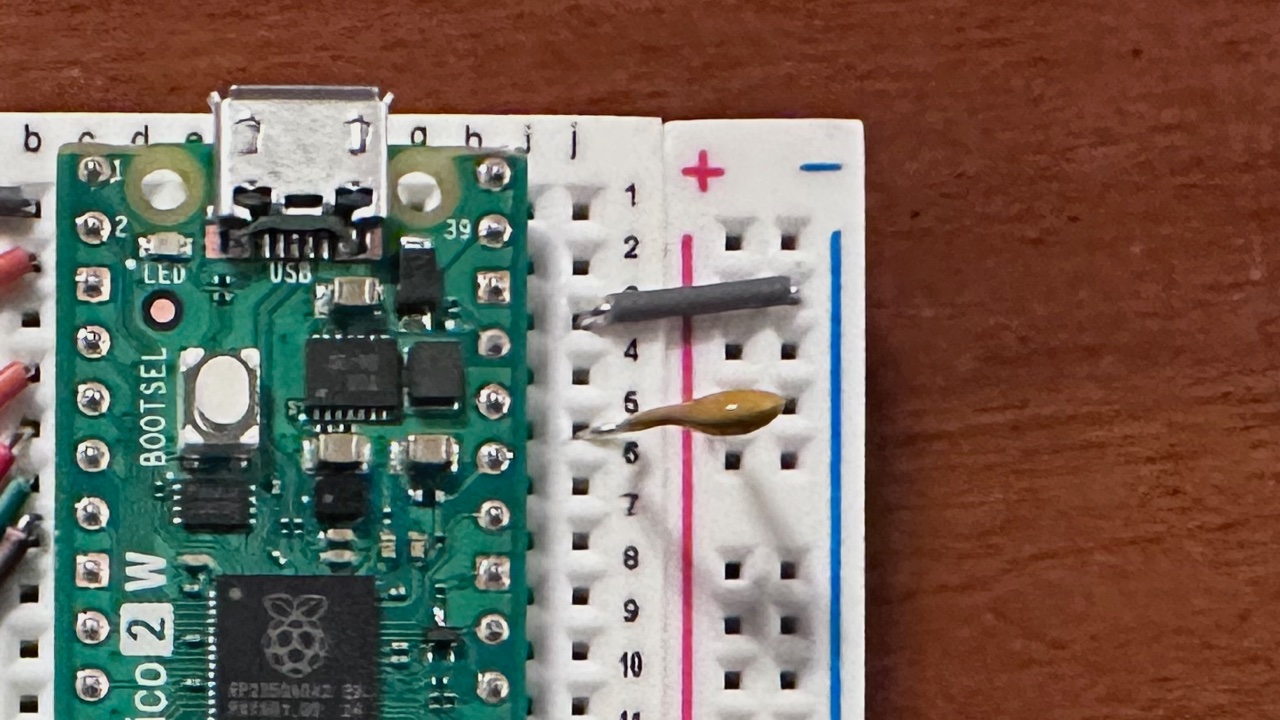 A resettable fuse (PPTC fuse or polyfuse) is the small orange-yellow component connecting the Pico 3.3V Out Pin to the breadboard + rail. When there is a short circuit, such as a jumper wire accidentally connecting VCC (breadboard + rail) to GND (breadboard - rail), it trips, preventing damage to the electronics. A few seconds after the circuit is fixed or the power is turned off, it cools down and resets itself. The students should verify all the connections and resume the experiment.
When setting up the connectors, students should disconnect the USB cable from Pico, and have multiple students verify the connections before connecting the USB cable. It is useful to count the pin distance from other used pins on the board.
Safety Procedure
Power Off ➔ Connect Components ➔ Verify Each Connection ➔ Power On
Lesson Plan Outline
- Introduction - Learn about electronics, breadboards, safety (10-20 min)
- Divide class into 5 teams (one per invention kit) (3-5 min)
- Students familiarize themselves with the invention kit components (3-5 min)
- Run first experiments, learning the basics (Blink, then Humidity Temp Sensor) (5-10 min)
- Run random experiments from the list, and present to other teams (20-30 min)
- Clean up and pack the kits (5-7 min)
Some Additional Notes
- To facilitate running additional workshops in future, students should pack the contents back into the boxes the way they found them.
- If teams have more than 3 students, they can take turns reading about an experiment and running an experiment.
- When students borrow sensors from the Additional Sensors Kit, they should return the sensors after their experiment so other teams can borrow them.
- Some experiments work in pairs, requiring 2 teams to collaborate using two Picos at the same time (Microphone sensor and melody, and bluetooth advertise and scan).
- Bluetooth advertise and scan should be a fun experiment for the entire class, where all the devices synchronize their LED colors to match one advertising device. You could direct one team to work on Bluetooth advertise and others to setup Bluetooth scan before time runs out.
Class Experiments Kit Contents
| Category | Item Description | Quantity per Box | Total Quantity |
|---|---|---|---|
| Invention Kit (5x) | Breadboard with Raspberry Pi Pico 2W, 6 push buttons, piezo buzzer, OLED screen module, RGB LED Module, resettable PPTC fuse, preset connectors | 1 | 5 |
| Invention Kit (5x) | Empty Battery Pack with USB-C to USB-A Adapter | 1 | 5 |
| Invention Kit (5x) | AA Alkaline Batteries, packed in a plastic bag with bubble wrap for shipping | 3 | 15 |
| Invention Kit (5x) | Micro USB to USB-C Cable | 1 | 5 |
| Invention Kit (5x) | Micro Servo Motor | 2 | 10 |
| Invention Kit (5x) | Capacitive Touch Sensor | 1 | 5 |
| Invention Kit (5x) | Temp & Humidity Sensor | 1 | 5 |
| Invention Kit (5x) | Ultrasonic Distance Sensor | 1 | 5 |
| Invention Kit (5x) | Joystick Module | 1 | 5 |
| Invention Kit (5x) | 10cm Jumper Wires | 20 | 100 |
| Additional Sensors Kit | PIR Motion Sensor Module | 1 | 1 |
| Additional Sensors Kit | Knock Sensor Module | 1 | 1 |
| Additional Sensors Kit | Potentiometer Module | 1 | 1 |
| Additional Sensors Kit | Microphone Sensor | 1 | 1 |
| Additional Sensors Kit | Accelerometer Module | 1 | 1 |
| Additional Sensors Kit | Photo Interrupter Module | 1 | 1 |
| Additional Sensors Kit | Crash Sensor Module | 1 | 1 |
| Additional Sensors Kit | Photoresistor Module | 1 | 1 |
| Additional Sensors Kit | Rotation Encoder Module | 1 | 1 |
| Additional Sensors Kit | NFC Nail Reward Stickers | 5 | 5 |
| Additional Sensors Kit | Assorted Reward Stickers | 5 | 5 |
| Additional Sensors Kit | Breadboard without Backing | 1 | 1 |
| Book | Get started with MicroPython on Raspberry Pi Pico Book | 1 | 1 |